
 Download
 Download
Last updated on 2026-07-28, by
Can You Download ManyVids Videos for Free? 3 Free Methods Explained
Summary: This guide compares three free methods to save ManyVids videos for offline viewing, focusing on reliability, video quality, ease of use, and the scenarios each method is best suited for.
I’ve had moments when I wanted to save a ManyVids video for offline viewing, whether for a long trip, limited internet access, or simply to keep content I had already purchased. After testing several free ManyVids download methods, I found that each works differently and is designed for a different purpose.
Some methods are the safest and preserve the original quality, while others prioritize convenience or require no software installation at all. To help you choose the right option, I’ve compared three free ways to download ManyVids videos in terms of video quality, ease of use, advantages, and limitations.
OutlineCLOSE
1. Quick Overview: 3 Free Methods Comparison
If you’re short on time, the table below provides a quick comparison of the three most common ways to download ManyVids videos.
| Method | Quality | Best For |
| Official Download Feature | Original | Purchased videos with creator permission |
| Online Video Downloader | Medium–High | Quick one-time downloads |
| Browser Extension | High | Frequent downloading |
Each method has its own strengths and limitations. The official download feature offers the highest reliability but is only available for eligible purchased videos. Online downloaders are convenient because they don’t require installation, while browser extensions provide a faster workflow for users who download videos regularly.
Now, let’s take a closer look at how each method works, along with its pros, cons, and the situations where it performs best.
2. 3 ManyVids Video Download Free Methods Explained
Method 1. Official Download Feature
The easiest and safest way to download a ManyVids video is by using the platform’s built-in download feature. If a creator has enabled downloads for a purchased video, you can save it directly from your account without relying on third-party tools.
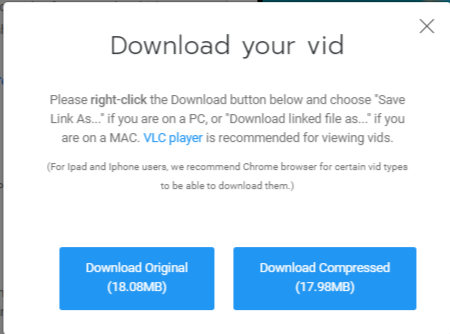
When a video is available for downloading, simply click the three-dot menu on the purchased video page, and you’ll see a Download option.
How to download ManyVids videos using the official download feature:
- Log in to your ManyVids account.
- Open the purchased video you want to save.
- Click the three-dot menu on the right side of the page.
- Select Download.
- Choose either the Original File or the Optimized File.
- Wait for the download to finish.
Pros:
- Safest and most reliable method
- Downloads the original video quality
- No advertisements or malware risks
- Supports creators directly
Cons:
- Only available when creators enable downloading
- Most downloadable videos must be purchased first
Overall, if downloading is available, this should always be your first choice because it provides the best video quality and the most reliable downloading experience.
Method 2. Online Video Downloader
If you don’t want to install any software, an online video downloader can be a convenient alternative. These tools typically work by analyzing the video URL and generating downloadable links directly in your browser.
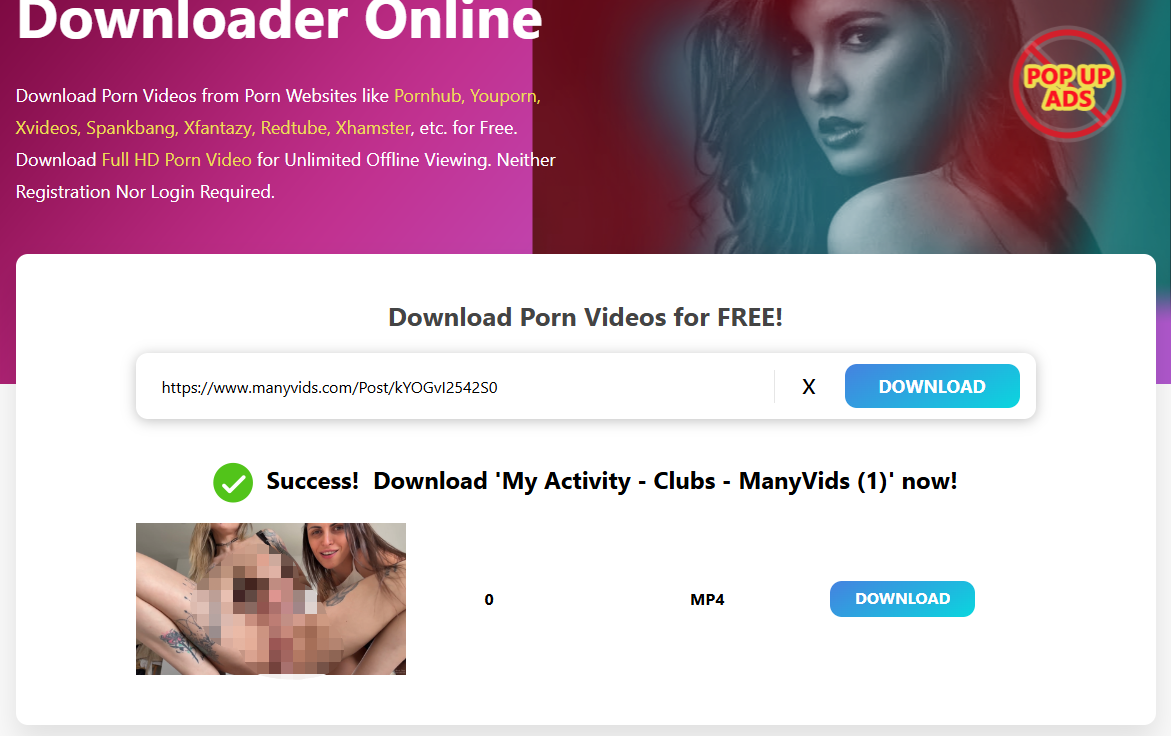
One commonly used option is PX Downloader. It allows you to paste a ManyVids video URL and download the available media without installing additional applications.
How to download ManyVids videos using PX Downloader:
- Copy the URL of the target ManyVids video.
- Open the PX Downloader website in your browser.
- Paste the copied URL into the input box.
- Click the download button and wait for the video to be analyzed.
- Select the available video quality.
- Save the video to your device.
Pros:
- No software installation required
- Works on Windows, Mac, Android, and iPhone browsers
- Fast and convenient for occasional downloads
Cons:
- Some websites may contain pop-up advertisements
- Video quality may not always match the original file
- Certain links may fail because of platform restrictions
- Generally less secure than the official download feature
Online downloaders are ideal for users who only need to download videos occasionally. However, because these services depend on third-party servers, their availability and reliability may change over time.
Method 3. Browser Extension
If you download videos frequently, a browser extension can save you time by detecting downloadable media automatically while you’re watching a video. Instead of copying and pasting URLs every time, you can simply click the extension icon and start the download.
Popular video downloader extensions are available for Chrome and Firefox. Most of them work by detecting media requests on the current webpage and providing available download options.
How to download ManyVids videos using a browser extension:
- Install a trusted video downloader extension from the Chrome Web Store or Firefox Add-ons.
- Open the target ManyVids video page.
- Play the video so the extension can detect the media stream.
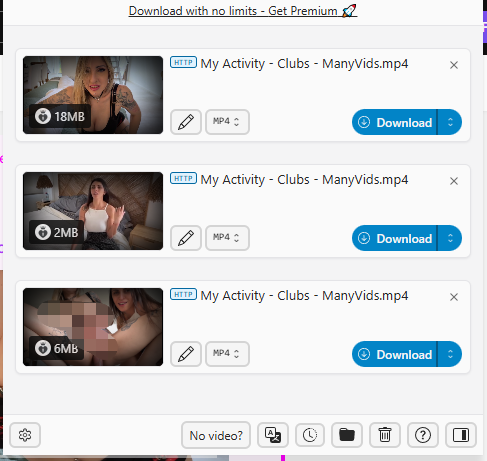
- Click the extension icon in your browser toolbar.
- Select the available download option and save the video.
Pros:
- Fast and convenient for frequent downloading
- May detect multiple video quality options
- No need to repeatedly copy and paste video URLs
Cons:
- Some extensions stop working after browser updates
- Privacy risks if using untrusted extensions
- May not support DRM-protected or restricted videos
Browser extensions are a good choice for users who regularly save online videos. However, because browsers frequently update their security policies, extensions may become unavailable or require frequent updates.
3. Final Verdict: Which Method Suits You Best?
Each of the three methods discussed above serves a different purpose. The best choice depends on whether you prioritize video quality, convenience, or downloading frequency.
| Method | Recommended For |
| Official Download Feature | Users who have purchased videos and want the safest way to preserve the original quality. |
| Online Video Downloader | Occasional downloads without installing additional software. |
| Browser Extension | Frequent users looking for a quicker downloading workflow. |
Recommendation: If you’ve purchased a ManyVids video and the creator allows downloading, always use the official download feature whenever possible. It delivers the original video quality, offers the highest reliability, and eliminates the security concerns associated with third-party tools.
If the official download option isn’t available, online downloaders can be useful for occasional downloads without installing software. Browser extensions are more suitable for users who download videos regularly and prefer a faster workflow, although compatibility may vary depending on browser updates and website changes.
Ultimately, choosing the right method comes down to your own needs. By understanding the advantages and limitations of each approach, you can download ManyVids videos more efficiently while maintaining the best possible viewing experience.
4. FAQs
Q1. How can I download multiple videos at once?
The official ManyVids download feature usually requires downloading videos individually. If you need batch downloading, a dedicated desktop downloader is generally more efficient than online tools or browser extensions.
Q2. What should I do if the downloaded video won’t play?
Try opening the file with a different media player, such as VLC. If the file is corrupted or incomplete, delete it and download the video again using a more reliable method.
Q3. Is there an easy way to download ManyVids videos on iPhone?
Yes. The simplest method to download ManyVids videos on an iPhone is usually to use an online video downloader that works in Safari. However, you should ensure the tool is trustworthy and avoid granting unnecessary permissions.
Q4. What are the best free download tools without ads?
Online video download tools like PX Downloader and open-source tools such as yt-dlp or JDownloader generally contain no ads. For browser extensions, choose well-reviewed options with minimal permissions.
-

9 Best Latina Adult Websites Worth Visiting in 2026Patrick/2026-09-28
-

How to Download PeekVids Videos on Mobile and PCPatrick/2026-09-28
-

How to Download JustPorn Videos: 3 Tested Methods ExplainedPatrick/2026-09-28
-

What Are the Best MILF Porn Sites? Top Options to Find MILF ContentPatrick/2026-08-26
-

Best Taboo Porn Sites That Specialize in Pure Forbidden PleasurePatrick/2026-08-25
-

Korean Adult Sites Complete Guide: The Best Korean Porn Sites Worth BookmarkingPatrick/2026-08-25
-
How to Download Videos From Eporner for Offline Viewing (4 Easy Methods)Patrick/2026-07-30
-
Can You Download ManyVids Videos for Free? 3 Free Methods ExplainedPatrick/2026-07-28
-

Is It Possible to Download RedTube Videos Online?Patrick/2026-07-30
-
How to Download MissAV Porn Videos in HD for Offline Viewing?Patrick/2026-09-01
-

Best Twitter Porn Accounts You Shouldn’t MissPatrick/2026-10-10
-

How to Download YouPorn Videos (Fast & Easy Guide)Patrick/2026-07-10
-

10 Best Free Indian Porn SitesPatrick/2025-05-26
-

Best Porn Games Sites: VR Game, Mobile Game and MorePatrick/2026-03-12
-

Top 10 JAV Porn Sites and How to Download JAV Porn for FreePatrick/2026-07-10
-

6 Best Soft Porn Sites for WomenPatrick/2025-07-04
-
TikTok Porn: The Hottest Sites and How to Download Those Sexy ClipsPatrick/2026-01-21
-

How to Find Porn on TikTok & How to Download TikTok PornPatrick/2025-04-10
-

Latina Porn – 7 Best Free Sites to Watch Sexy LatinosPatrick/2025-08-19
-

How to Download Nude Videos from OnlyTik Without SoftwarePatrick/2025-04-25